Showing posts with label Alchemy. Show all posts

Saturday, January 24, 2015

Destructor 2015 - The Updated FPS Game Based on Bengine with Source Code

Destructor is the voxel based FPS game power by Bengine I made for the 7DFPS in 2012. Since Mochi Media was down, high score submission doesn't work any more. Recently, I finally updated the game and cleaned up the source code for a new release. This re-release comes with updated control, and on screen joystick for windows/android tablets. I also implemented high score submission using the newgrounds, kongregate and gamersafe API.

Play the game here:
http://www.newgrounds.com/portal/view/652322

Source Code (SVN, code only): https://flaswf.googlecode.com/svn/trunk/Games/Destructor/Destructor2015/

Source Code with Assets (All in one package): TO DO.

Credits:

Music: Theme Crystalized by Ove Melaa [CC-BY 3.0]: http://opengameart.org/content/theme-crystalized-orchestral-epic-scoresong
and see also http://bruce-lab.blogspot.com/2012/06/destructor-voxel-based-fps-game-power.html

Explosion effect forked from http://wonderfl.net/c/cWPq

Note: To compile the C source code to Bengine.swc, you may need the old Adobe Alchemy compiler. (You can find the backup download here.)

Wednesday, July 30, 2014

Migrating from Alchemy to CrossBridge/FlasCC - Interop between C/C++ and ActionScript

Part I - Calling C/C++ functions from AS3

For calling C/C++ functions from AS3, one way is use the "as3sig:" annotation to expose some C/C++ functions to AS3. See the CrossBridge Sample 5 SWC and my previous post http://bruce-lab.blogspot.com/2012/12/migrating-from-alchemy-to-flascc.html. Another way is to use "CModule.callI(CModule.getPublicSymbol("youCfunctionname"), args)", see the Sample 4 Animation, where for C++, you will need "extern" declaration before your function definition to prevent the compiler renaming the function.

Part II - Calling AS3 functions from C/C++

To call build-in AS3 functions, you can either use "inline_as3" (see Sample 2 Interop between C/C++ and ActionScript. Actually, asm was also available in Alchemy, although not officially documented) or the API provided by "AS3.h" and "Flash++.h". You can also define local AS3 functions or equivalent C/C++ functions using the two methods in your C/C++ source file. However, if you want to call an AS3 function outside your C/C++ file, e.g., in the "Main.as/Console.as", you may need to pass the reference of your AS3 function or the function host - your main AS3 class to C/C++. There are two different cases depending whether your run the C/C++ code in the background worker.

Case 1 - C/C++ code in UI worker.

If you invoke your C/C++'s main function using "CModule.start()", or "CModule.startAsync()", or just simply call some C/C++ function using the methods in Part I without executing the C/C++ main function, the C/C++ code will run in the UI worker, the same domain as your main AS3 console class. Then things are easy and there are various ways for passing your Main class's reference, see my examples:
https://flaswf.googlecode.com/svn/trunk/flaswfblog/Tutorials/CB_callAS3fromC/nobgcall

Case 2 - C/C++ code in background worker.

If you invoke your C/C++'s main function using "CModule.startBackground()", and want to call some outside AS3 function from your C/C++'s main function, then the thing become a little tricky, because you're not able to share a function reference between workers, i.e., there is no way to pass a function reference from the UI worker - your Main/Console class to the background worker - your C/C++ code, as the class/function reference can't be serialized in AMF3 format. There is one way to circumvent the problem, using MessageChannels:
https://flaswf.googlecode.com/svn/trunk/flaswfblog/Tutorials/CB_callAS3fromC/bgcall

In other situations, you can access your Main UI class's properties from the background worker by the "avm2_ui_thunk" and "CModule.serviceUIRequests" combinations, see http://bruce-lab.blogspot.com/2014/07/crossbridge-quake1-example-simplified.html for details.


Links:
http://forums.adobe.com/message/6002640#6002640

http://www.bytearray.org/?p=4423
http://www.bytearray.org/?p=4423#comment-494548

http://help.adobe.com/en_US/as3/dev/WS2f73111e7a180bd0-5856a8af1390d64d08c-8000.html
http://help.adobe.com/en_US/as3/dev/WS2f73111e7a180bd0-5856a8af1390d64d08c-7fff.html
http://help.adobe.com/en_US/FlashPlatform/reference/actionscript/3/flash/system/Worker.html

http://jacksondunstan.com/articles/tag/workers
http://esdot.ca/site/2012/intro-to-as3-workers-hello-world
http://probertson.com/articles/2012/11/07/as3-concurrency-workers-use-cases-best-practices-links/

Thursday, May 1, 2014

Migrating from Alchemy to FlasCC/CrossBridge - The flyield() Method Alternative

In Alchemy, when you're compiling and reusing C/C++ code in Flash, you may encounter the problem caused by loops. In C/C++, it's very common to use a infinity loop such as

while(1)
{
}
or
for(;;)
{
}
where we will put everything such as main game logic, into the loop and break the loop when certain conditions are satisfied. However, this way doesn't work for Flash. At the time of Alchemy, Flash/Action Script 3 was still 'single' threaded. This infinity loop will block everything - no UI updates, no interaction responses, the Flash program looks like dead - as everything else is waiting for the loop to finish. One way to solve the problem is to break this C/C++ run-loop into frame by frame calls on the AS3 side (See CrossBridge SDK's "Sample 4: Animation" for details). At that time, we have one handy function called "flyield()" in the Alchemy C/C++ API, to simplify the solution. All you need is to stuff such function into those infinity loops, and declare the functions contains those infinity loops as "AS3_FunctionAsync". And when Flash sees this "flyield()" function, it will know that it should freeze the loop for a while, jump out to update the UI and let other things work, then come back to run the loop again.

However, there is no such function "flyield()" any more in FlasCC/CrossBridge. But now, we have two ways to deal with such infinity loops. One is the way provided by the newly introduced concurrency API, the other is the classical "flyield()"-like way.

Thanks to the new concurrency API of Action Script 3, you will never need to worry about the error that "Error #1502: A script has executed for longer than the default timeout period of 15 seconds". With workers, you can do all the computation intensive calculations in the background, and let the UI runs in main thread. So those intensive calculations will not block your whole program any more. And the concurrency API is also available in FlasCC/CrossBridge. To use the concurrency API, you can check the "Sample 9 - Pthreads" in the CrossBridge SDK.

In FlasCC/CrossBridge, you simply can run all the C/C++ code in the background worker by the following line in your "Console.as".
CModule.startBackground(this, new [], new [])
The most common case is in your Main loop, you need to pause the logic and let the UI listen to the user input. In many C/C++ applications, the waiting for user input model is an infinity loop. In this case, you can use "avm2_self_msleep" to pause the loop and add an input event listener, once get the user input, use "avm2_wake" to resume the loop and the main logic.
See the following source code of for more details:
https://flaswf.googlecode.com/svn/trunk/Games/Sanguosha/lib
(especially the file "FlasCCPortLayer.cpp". Update: (2014/7/18) Alternative way for getting input is to use the "avm2_ui_thunk" and "CModule.serviceUIRequests" combination, see the Crossbridge quake1 example for details.)

The above way works for some cases, for example when the C/C++ function consume a lot time to run, but is not so convenient for many C/C++ game logic as the old " flyield()" function in the aforementioned case. You need to reorganize the code structure using workers. To make things easy, actually, there is an almost equivalent function in FlasCC/CrossBridge - "avm2_wait_for_ui_frame".
To use this "flyield()" alternative, you must also run your C/C++ code in the background. In other words, you need the following code in your "Console.as" again:
CModule.startBackground(this, new [], new [])
Then, all you need to do is to insert the following code
avm2_wait_for_ui_frame(0);
somewhere in the infinity loop.

One drawback of this method is that you need to put the C/C++ loop in your main function. This is not very convenient as the old "AS3_FunctionAsync" declaration in Alchemy when you want to pass some parameters into the loop. One way is to initialize parameter as global variables in C/C++ by passing values from AS3 side before call the C/C++ main function(CModule.startBackground), another way is to use the C/C++ "argv" - the second parameter of CModule.startBackground. Well, this may solve the problem to pass parameters, another important issue is that how to return values from C/C++ main to AS3? So you can see this workaround, which only works with the C/C++ main function, is still not so convenient as the old asynchronous functions in Alchemy. In this case, different from the main logic loop, actually you usually want a C/C++ function to do some time consuming calculation and return the result, while not be restricted by the Flash script execution time limit. To resolve all the difficulties and troubles fundamentally, you'd better use the more advanced and complicated Pthreads (See "Sample 9: Pthreads") and Workers (run the FlasCC/CrossBridge wrapper function in the background as what you can do with a time consuming AS3 function, see for example http://esdot.ca/site/2012/intro-to-as3-workers-hello-world) with FlasCC/CrossBridge.

Source code of an example using avm2_wait_for_ui_frame:
https://flaswf.googlecode.com/svn/trunk/flaswfblog/Tutorials/flyieldAlternative

Links:
http://stackoverflow.com/questions/13560133/increase-flash-script-execution-time-flascc
http://forums.adobe.com/message/6227761

Sunday, October 27, 2013

Simple Chinese Word Segmentation Lib for Flash AS3 - SCWS Ported to Flash Using CrossBridge

Unlike English sentences, in a Chinese sentence, there is no space between two words (http://en.wikipedia.org/wiki/Text_segmentation). This can cause lots of trouble for processing the language on computer.

SCWS is a simple Chinese word segmentation C lib. I just ported it to Flash using CrossBridge - the latest open source version of FlasCC. You can use the pre-build swc library "libscws.swc" in your Flash/AS3 projects.

The SCWS lib depends on an extra ".xdb" dictionary file and a ".ini" rule file, which can be downloaded at http://www.xunsearch.com/scws/download.php. However, the CrossBridge's file system is not as simple as the old Alchemy(See this post, and simplified code), so I use the class by twistedjoe from http://forums.adobe.com/thread/1147910, which doesn't require any genfs processing on the files.

There is almost no modification of the original C source files, except for the file "lock.c", I commented the line to pass the gcc complains:

//#warning no proper flock supported

To use the swc library, you must set compiler options "enable strict mode" to false! Otherwise, the AS3 compiler will throw error "Error: Call to a possibly undefined method addEventListener through a reference with static type CrossBridge.libscws.vfs:URLLoaderVFS".

There are two main functions in the AS3 library: "initialize_SCWS_AS3()" and "scws_send_text_AS3()".
For using the "libscws.swc", firstly, load the dictionary file and the rule file and supply them to the C module. This can be done in common CorssBridge/FlasCC routine: use a URLLoaderVFS's "loadManifest" function to load the manifest file, which contains the files' names and paths.(See the demo's source code for more details, for the manifest file, https://github.com/twistedjoe/flascc-URLLoaderVFS gives more information.) After the dictionary file and the rule file were loaded, call "initialize_SCWS_AS3()", which will initialize the library for use. Then you can call the function "scws_send_text_AS3(input:String):String", with the text to be processed as the parameter, and it will return the processed text, with space as delimiter.

Here is the demo(Input the texts at the bottom, Return Key for sending to the console.):


Full source code of the demo and the lib:
https://flaswf.googlecode.com/svn/trunk/LibSCWS

Links:
http://www.xunsearch.com/scws/
http://nlp.stanford.edu/software/segmenter.shtml
http://ictclas.org/index.html
http://technology.chtsai.org/mmseg/
http://www.coreseek.cn/opensource/
https://github.com/fxsjy/jieba

Sunday, December 30, 2012

Migrating from Alchemy to FlasCC - Compiling C/C++ to SWC


New year, new tools! The updated new version of Alchemy, the C/C++ to AS3 compiler - FlasCC was released some time ago. Many things have been changed. These two tools - Alchemy and FlasCC have very different APIs. However, if you have some experience with the old Alchemy, migrating from it to FlasCC is not hard.

In this post I will share my experience of migrating from Alchemy to FlasCC. I ported the very classic Alchemy example to FlasCC - Ralph Hauwert's Alchemy lookup-table effects. I will use that example to show you how to compile C/C++ code to SWC, how to use FlasCC to manipulate screen buffers, as well as the changes of the APIs.

The installation of FlasCC has been greatly simplified. You don't need to install Cygwin separately like Alchemy because the new FlasCC tool is already integrated with Cygwin. First, you have to get the FlasCC tools at
http://gaming.adobe.com/technologies/flascc/.
Unzip the package to somewhere (mine is "D:\FlasCC_1.0.0"), click "run.bat", then you will open the Cygwin window.

Let compile the sample first:

cd 05_SWC
make FLASCC=/cygdrive/d/FlasCC_1.0.0/sdk FLEX=/cygdrive/d/Program\ Files/FlashDevelop/Tools/flexsdk
This sample is a very simple and good start. You should try to read the source code and the official notes:
http://www.adobe.com/devnet-docs/flascc/docs/samples.html#T5

To create a SWC from some C/C++ functions, we need to write some wrapper code (as3api.cpp) to expose the functions to AS3.
In Alchemy, it will be something in the C/C++'s main() function like this:
int main()
{
AS3_Val initializeScreenDiffuseBufferMethod = AS3_Function(NULL, initializeScreenDiffuseBuffer);
AS3_Val rasterizeMethod = AS3_Function(NULL, rasterize);
AS3_Val setupLookupTablesMethod = AS3_Function(NULL, setupLookupTables);
AS3_Val initializeDiffuseBufferMethod = AS3_Function(NULL, initializeDiffuseBuffer);
AS3_Val result = AS3_Object("initializeScreenDiffuseBuffer: AS3ValType, rasterize:AS3ValType,setupLookupTables:AS3ValType,initializeDiffuseBuffer:AS3ValType"
,initializeScreenDiffuseBufferMethod, rasterizeMethod,setupLookupTablesMethod,initializeDiffuseBufferMethod);
AS3_Release( initializeScreenDiffuseBufferMethod );
AS3_Release( rasterizeMethod );
AS3_Release( setupLookupTablesMethod );
AS3_Release( initializeDiffuseBufferMethod );
AS3_LibInit( result );
return 0;
} 
While in FlasCC, it will be some declarations and wrapper functions outside the main function like this:
void rasterize_AS3() __attribute__((used,
annotate("as3sig:public function rasterize_AS3():void"),
annotate("as3package:FlasCCTest.lookupeffect")));

void rasterize_AS3()
{
rasterize();
}

void setupLookupTables_AS3() __attribute__((used,
annotate("as3sig:public function setupLookupTables_AS3():void"),
annotate("as3package:FlasCCTest.lookupeffect")));

void setupLookupTables_AS3()
{
setupLookupTables();
}
And the main function in FlasCC:
int main()
{
AS3_GoAsync();
}

The basic framework for using C/C++ to manipulate screen buffers:
1. Pass the texture's pixel data as ByteArray to C/C++ array.
2. Process the textures in C/C++.
3. Retrieve the screen buffer array (as bytearray) to flash and use a bitmap to render it.
The best way to pass bytearray between C/C++ and AS3 is to use pointers and C machine's RAM.

Please read the full source code of my example for details.

To pass parameters from AS3 to C/C++, and return the pointer of the array tBuffer (the screen buffer) in Alchemy:
AS3_Val initializeScreenDiffuseBuffer(void* self, AS3_Val args)
{
AS3_ArrayValue(args, "IntType, IntType", &resX, &resY);
tBuffer = malloc( resX * resY * sizeof(int) );
return AS3_Ptr(tBuffer);
}
In FlasCC:
int* initializeScreenDiffuseBuffer(int resX, int  resY)
{
tBuffer = (int*)malloc( resX * resY * sizeof(int) );
return tBuffer;//&(tBuffer[0]);//return the pointer to the screen buffer
}

void initializeScreenDiffuseBuffer_AS3() __attribute__((used,
annotate("as3sig:public function initializeScreenDiffuseBuffer_AS3(resX0:int,resY0:int):uint"),
annotate("as3package:FlasCCTest.lookupeffect")));

void initializeScreenDiffuseBuffer_AS3()
{
int* result;
//copy the AS3 resolution variables resX0, resY0 (parameters of the swc function initializeScreenDiffuseBuffer_AS3) 
//to C variables resX, resY in lookupeffect.c
AS3_GetScalarFromVar(resX,resX0);
AS3_GetScalarFromVar(resY,resY0);
//get the pointer of the screen buffer
result = initializeScreenDiffuseBuffer(resX,resY);
// return the result (using an AS3 return rather than a C/C++ return)
AS3_Return(result);
}

Now let's see some differences of the AS3 APIs:
To initialize the C/C++ SWC Lib in Alchemy:
cLibInit = new CLibInit();
alcLookupLib = cLibInit.init();
In FlasCC:
CModule.startAsync(this);
To call the SWC functions:
Alchemy:
alcLookupLib.setupLookupTables();
alcDiffuseBitmapPointer = alcLookupLib.initializeScreenDiffuseBuffer(IMAGE_WIDTH,IMAGE_HEIGHT);
FlasCC:
setupLookupTables_AS3();
alcDiffuseBitmapPointer = initializeScreenDiffuseBuffer_AS3(IMAGE_WIDTH, IMAGE_HEIGHT); 
To use domain memory - the C machine's RAM (http://www.adobe.com/devnet-docs/flascc/docs/apidocs/com/adobe/flascc/CModule.html#ram):
Alchemy:
var ns : Namespace = new Namespace( "cmodule.lookupeffect");
alchemyMemory = (ns::gstate).ds;
alchemyMemory.position = alcDiffusePointer;
alchemyMemory.writeBytes(ba,0,ba.length);

alchemyMemory.position = alcDiffuseBitmapPointer;
screenDiffuseBitmapData.setPixels(screenDiffuseBitmapData.rect, alchemyMemory);
FlasCC:
CModule.writeBytes(alcDiffusePointer, ba.length, ba);
CModule.readBytes(alcDiffuseBitmapPointer, 512 * 512 * 4, ba);
or
CModule.ram.position = alcDiffuseBitmapPointer;
screenDiffuseBitmapData.setPixels(screenDiffuseBitmapData.rect, CModule.ram);

The source code:
https://flaswf.googlecode.com/svn/trunk/flaswfblog/Tutorials/FlasCC_SWC

Links:
http://www.adobe.com/devnet-docs/flascc/docs/Reference.html
http://unitzeroone.com/blog/2009/04/06/more-play-with-alchemy-lookup-table-effects/
http://blog.debit.nl/2009/03/using-bytearrays-in-actionscript-and-alchemy/

Wednesday, December 26, 2012

Bengine Race - Full Source Code of the Game and the Engine Released!

Here is the full source code for the game Bengine Race:
https://flaswf.googlecode.com/svn/trunk/Games/BengineRace

This release includes the C source code of the voxel engine - Bengine and the AS3 source code of the experimental game - Bengine Race.

You need Alchemy V0.5 (the "outdated" one, not FlasCC) to compile the C source code files to the swc.
You can find my backup of Alchemy Tools here:
https://docs.google.com/folder/d/0B5V2PrQ8xX_EN2NCWHkySGlMclE/edit
Or try the Alchemy Repack for Win32:
http://www.covergraph.com/blog/?p=367

Bengine is still under active development. This release is actually a very old version of Bengine. Since there is no schedule for an "official" release, I decided to share this early version first.

Saturday, September 29, 2012

An Introduction to Flash SDL

Emcmanus's Flash SDL (Simple DirectMedia Layer) using Alchemy V0.5 is very useful for porting C/C++ & SDL based games to Flash. Although Alchemy 2 (FlasCC) is coming soon, and it will have much better support for SDL, Emcmanus's simple Flash SDL library with Alchemy V0.5 just works fine for me now. So I think this simple tutorial for Flash SDL can still be helpful for some people.

1. Flash SDL Installation
You should correctly installed Alchemy V0.5 first. Then goto https://github.com/emcmanus/flashsdl, download the repository zip, it should be "emcmanus-flashsdl-04ce063.zip". Unzip, and
Copy "sdl/SDL.l.bc" to your Alchemy's lib directory, e.g., "D:\alchemy-cygwin-v0.5a\usr\local\lib",
(or within Cygwin "cp sdl/SDL.l.bc $ALCHEMY_HOME/usr/local/lib/")
Copy all header files in "sdl/include" to your Alchemy's include directory, e.g., "D:\alchemy-cygwin-v0.5a\usr\local\include"
(create this folder by yourself if it does exists, or within Cygwin "cp sdl/include/*.h $ALCHEMY_HOME/usr/local/include/")

Now let's test the sample project.
Open Cygwin Terminal, build the swc lib for our project:

cd /cygdrive/f/alchemy/emcmanus-flashsdl-04ce063/
source /cygdrive/d/alchemy-cygwin-v0.5a/alchemy-setup
alc-on  
gcc flashSDL.c -DFLASH -Isdl -lSDL -swc -O3 -o libSDL.swc
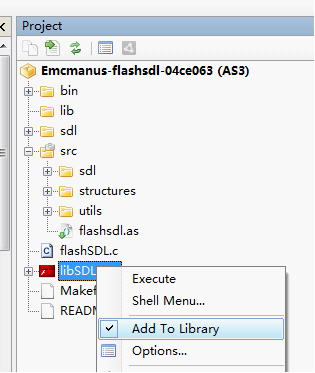
Run FlashDevelop and create a new AS3 project in the "emcmanus-flashsdl-04ce063" folder, set "flashsdl.as" as the document class, and add "libSDL.swc" to Library.


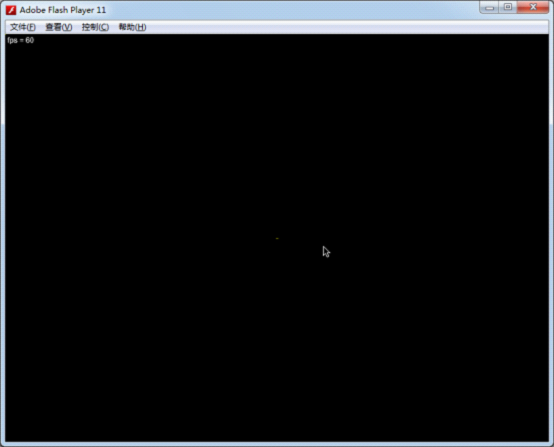
Finally build & test the project, you should see a black screen with SDL's mouse icon:

Let see the author's comments for porting your SDL application to FlashSDL:
"Porting your SDL application to FlashSDL
Perhaps this is best understood by example. Examine ./flashsdl.c. Most immediately you will have to refactor your C application's main loop to run iteratively in the tick() method, assuming you end up using the application scaffolding in ./src/.
Make sure you've properly built and installed FlashSDL by building the test application. Then try running your application's ./configure.
Once you've successfully compiled, try linking the resuling SWC with the AS3 side of your application (which should be built on ./src/).
Other Tips
You have to set the color depth of your application to 32 Bits per pixel (in your call to SDL_SetVideoMode)."

Basically, the .as files in "./src/" folder is used to fetch the SDL's pixel buffer and display this buffer using a Flash bitmap at each frame. The "flashsdl.c" should be your skeleton for your own C/C++ project. Just move the initializing code into the setup() function and refactor the mainloop into the tick() method. You can also make use of those already declared variables in that file, such as using "TMPFLASH_screen" as your main screen buffer.

2. Displaying BMP Images in Flash SDL
The code in this section is based on Lazy Foo' tutorial: http://lazyfoo.net/SDL_tutorials/lesson01/index2.php.

(Flash) SDL has build-in BMP image support. To let the Flash SDL load a BMP image, we need to modify some AS3 code:
in "\src\sdl\LibSDL.as"
internal var cLoader:CLibInit;
To
public var cLoader:CLibInit;
Then embed the image file and supply it to Alchemy - related AS code in modified "flashsdl.as":
[Embed(source="../hello.bmp",mimeType="application/octet-stream")]
public static var hellobmpClass:Class;
...
this.libSDL = new LibSDL();
this.libSDL.cLoader.supplyFile("hello.bmp", new hellobmpClass());
...
Now you can load the image "hello.bmp" form C side normally. Please find the full C side code for loading and displaying the image in my source code package for this tutorial.
After adding the image loading and displaying code on the C side, recompile you will see something like this:


3. Playing Sound in Flash SDL
The Flash SDL does not have sound support yet on the C side.There is a fork on github which tried to add sound support, https://github.com/kompjoefriek/flashsdl, but it is not usable yet and there is no updates for a long time. Noticing that most SDL applications are using SDL_mixer library instead of SDL_sound, I think a much wiser way is to use Flash's build in sound support instead of porting both libraries. You can also find my simple solution for playing "mp3" files in source code package (ALC_GE2D_PlaySound.c, flashSDL_sound.c), I just wrote some simple function calls to let the C function call the AS3 method for playing mp3.

4. True Type Font support and SDL_ttf in Flash SDL
Thanks to Emcmanus again, who has already ported the FreeType library to Flash, we can use the SDL_ttf library in Flash SDL to display true type font texts.

First, goto https://github.com/emcmanus/FlashFreeType, download the compiled lib in the repository zip,
Copy "freetype.l.bc" into "D:\alchemy-cygwin-v0.5a\usr\local\lib",
and
Copy all header files in ".\src\c\freetype-2.3.9\include" to "D:\alchemy-cygwin-v0.5a\usr\local\include".

Then download the source file of SDL_ttf, form http://www.libsdl.org/projects/SDL_ttf/, put SDL_ttf.h SDL_ttf.c into the same folder of "flashSDL_sound_font.c", and include both files in "flashSDL_sound_font.c" using
#include "SDL_ttf.h"
#include "SDL_ttf.c"
After added some testing code for displaying text in "flashSDL_sound_font.c"'s setup method (please find the related C code in this tutorial's source code package, which are all based on http://lazyfoo.net/SDL_tutorials/lesson07/index.php), build the swc using some command like:
g++ flashSDL_sound_font.cpp -DFLASH -Ifreetype -Isdl -lfreetype -lSDL -swc -O3 -o libSDL.swc
Also embed and supply the font file to C:
[Embed(source="../lazy.ttf",mimeType="application/octet-stream")]
public static var fontClass:Class;
...
this.libSDL.cLoader.supplyFile("lazy.ttf", new fontClass());
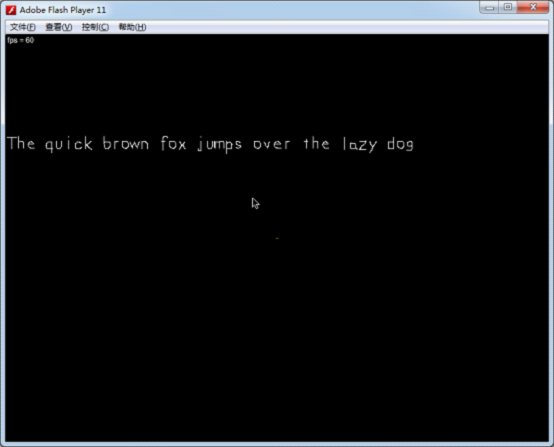
Recompile the swf, you will see the font displaying successfully:

Note: when using g++ to build the swc instead of gcc, you may need to edit some function declarations from "flashSDL_sound_font.c" to:
AS3_Val setup(void *data, AS3_Val args);//need arguments here!
AS3_Val quitApplication(void *data, AS3_Val args);//need arguments here!
AS3_Val tick(void *data, AS3_Val args);//need arguments here!
AS3_Val FLASH_getDisplayPointer(void *data, AS3_Val args);//need arguments here!

5. Fix the Arrow Keys Bug in Flash SDL
You may find that arrow key event will be ignored if you're using the precompiled "SDL.l.bc" provided by the author. This is very inconvenient since many game applications are heavily relying on arrow keys. To add arrow key support, find the "SDL_flashevents.c" file in "\emcmanus-flashsdl-04ce063\sdl\src\video\flash\" folder, goto the "FLASH_InitOSKeymap" function and add four lines for mapping arrow key events at the end of that function as below:
void FLASH_InitOSKeymap(_THIS)
{
...
keymap[SCANCODE_APOSTROPHE] = SDLK_QUOTE;

keymap[38] = SDLK_UP;
keymap[40] = SDLK_DOWN;
keymap[37] = SDLK_LEFT;
keymap[39] = SDLK_RIGHT;
}
Recompile the "SDL.l.bc"
In sdl/:
make -f Makefile.flash clean all;
cd F:/alchemy/emcmanus-flashsdl-04ce063/sdl
Copy the compiled "SDL.l.bc" (F:\alchemy\emcmanus-flashsdl-04ce063\sdl) into "D:\alchemy-cygwin-v0.5a\usr\local\lib" and replace the old one. You can also find the updated "SDL.l.bc" in my source code package. If you don't want to recompile the whole Flash SDL library, simply copy mine and replace the old one.
After that, recompile the swc and your Flash project, arrow keys should work then.

6. Fix the supplyFile bug in Alchemy
This bug had been described by me here: http://forums.adobe.com/thread/942556. The usual problem brought by the bug is that game saves can only be loaded once (if you use fopen on the C side) in each game session. You always need to restart the flash player (and hence your game) to load game saves if you have used the first opportunity. The bug is caused by that using "supplyFile" twice with the same file path won't work if you ever used "fopen" between the two "supplyFile"s.

To fix this bug, you need to modify the generated .as file by Alchemy as described in my old post:
http://bruce-lab.blogspot.sg/2011/01/adobe-alchemy-hacks-compile-as-source.html

First download the fixed version of "alc-asc" here: http://flaswf.googlecode.com/svn/trunk/QuickAlchemy/Hack/SWC/, put it into your "alchemy/achacks" folder, and search & replace the string "F:/alchemy/" to your Alchemy path (mine is "D:/alchemy-cygwin-v0.5a/").
When building the swc using Alchemy, keep the "XXXX.achacks.as" file, then open it, commentize the line "if(!res)" in the function "fetch", so the patched function should look like this:
private function fetch(path:String):Object
{
var res:Object = statCache[path];

//if(!res)
{
var gf:ByteArray = gfiles[path];
...
Finally, recompile the ".as" file into the swc.
alc-asc 6956.achacks.as libSDL.swc
With this patched swc, "supplyFile" will work well.

Links:
1. The source code package for this tutorial:
https://flaswf.googlecode.com/svn/trunk/flaswfblog/Tutorials/FlashSDL

2. Two example SDL games ported to Flash (with full source code):

Infinite Balls:
Demo: https://en.mochimedia.com/community/games/Bruce_Jawn/infinite-balls
Source Code: https://flaswf.googlecode.com/svn/trunk/Games/InfiniteBalls

Sword Girl:
Demo: https://en.mochimedia.com/community/games/Bruce_Jawn/_v52410
Source Code: https://flaswf.googlecode.com/svn/trunk/Games/GirlSwordFlash

3. Array @ARGV missing the @ in argument 1 of shift() at problem
http://forums.adobe.com/message/3892045

4. Flash SDL FlasCC version:
https://github.com/alexmac/alcextra 

Thursday, August 2, 2012

Alchemy v0.5a Installation Notes

Got a new notebook, so I will post some notes for future reference. Here is the one for Adobe Alchemy,

Environment: Windows 7.
Official Instructions:
http://labs.adobe.com/wiki/index.php/Alchemy:Documentation:Getting_Started#Windows

1. Go to http://cygwin.com/install.html, download the "setup.exe" and install cygwin (to C:\cygwin) with the following packages:
zip (archive), gcc-g++, make (devel), perl.


2. Downloaded alchemy package at http://labs.adobe.com/downloads/alchemy.html,
(Backup: https://docs.google.com/folder/d/0B5V2PrQ8xX_EN2NCWHkySGlMclE/edit)
unzip it to D:\alchemy-cygwin-v0.5a.

3. Open Cygwin Terminal, input the following commands:
cd D:\alchemy-cygwin-v0.5a
./config


4. Test alchemy with the commands to build the sample files:
source /cygdrive/d/alchemy-cygwin-v0.5a/alchemy-setup
alc-on
cd D:/alchemy-cygwin-v0.5a/samples/HelloFlash
gcc HelloFlash.c -O3 -Wall -swf -o HelloFlash.swf

and

cd D:/alchemy-cygwin-v0.5a/samples/stringecho
gcc stringecho.c -O3 -Wall -swc -o stringecho.swc

It works and successfully generated the swf and swc files!

Thursday, June 14, 2012

Destructor - Voxel based FPS game power by Bengine for the 7DFPS!


Voxel based First Person Shooter created in Flash.

OBJECTIVE:
Destroy the world as much as you can! Less voxels remaining means higher score rank.
No enemies, no life bars, no bullets & time limits, just enjoy the shooting in the fully destructible environment. Be a Destructor!

TIPS:
Use "portals" (holes) on the ground to go to higher place.

INSTRUCTIONS:
Aim/Shoot: Left Mouse
Move/View: WSAD QEZX/Arrow Keys
Jump: Space
Pause Game: Enter (You can submit your scores in the pause menu.)

Download the SWF: https://flaswf.googlecode.com/svn/trunk/Games/Destructor/Destructor.swf

I've wanted to create a FPS game using Bengine since two years ago when I released the game "Bengine Race". Bengine was designed for FPS games but there was only one experimental "Racing" game made using it. The fact is that I didn't drop Bengine, I'm still developing on it silently when I have time. There were several new versions of the engine I used for the game "Bengine Race". I named them as "PBengine", "ASPBengine" and finally "ReBengine". In ASPBengine, I ported many Bengine's C code to AS3, such as the code for physics and controls, only leave the rendering core in C for speed. This game "Destructor" uses ReBengine, where "Re" stands for "Revert" instead of "Revision". For a long time I tried to optimize the engine for maximum speed at the cost of the graphics' quality. And when ASPBengine can run at above 60 FPS, I realized that the aliasing is intolerable. The low resolution of the original "Bengine" is already intolerable to many players, so I revert the rendering algorithm to the original "Bengine" and that's what "ReBengine" means.

ReBengine should be a litter faster than the original Bengine, though they use similar rendering algorithm. One difference is that ReBengine has more AS3, so it is much easier to compile and test. And the milestone is that ReBengine has a fully scriptable in-game voxel world editor, which is still under development.

Thanks to 7DFPS, it gives me a good motivation to make such a simple experimental FPS game. 7 days are enough for a good game, if you can work full time on it. It's a pity that I don't have much free time here to make my game complete. When I started, the rendering engine with simple physics was almost done, but there was still much to do for a game engine. I spent several days' free time and finished the game framework as well as the shooting prototype, and integrated them with Bengine. Running out of time for map design, I borrowed the map from Bengine Race. Hope you will enjoy it.

Credits: (for whatever helped to develop this game)
FlashDevelop
Adobe Alchemy
GIMP
Inkscape
http://cooltext.com
http://www.flamingtext.com
http://7dfps.org
Boostworthy Animation System
Mochi Service

And ...

Saturday, June 2, 2012

Source Code of the Game - Wolf5k Flash


Description: A fast paced First Person Shooter. Classic FPS game Wolfenstein3D like first pernson shooting game.
Remake of Wolf5K in Flash.
Objective: Eliminate all enemies in the level to go to next level.
This game has infinite number of levels.
Enter key to view time, level, enemies left, total kills, life and score.
Instructions:
Mouse Move: Move
W/up: move forward
S/down: move back
Q/left: turn left
E/right: turn right
A/Z: strafe left
D/X: strafe right
----------
Space/Right Click: shoot
Enter: pause game/view game status
M: show/hide map

Source Code: https://flaswf.googlecode.com/svn/trunk/Games/Wolf5kFlash/

Special Thanks to:
http://code.dawnofthegeeks.com/2009/05/05/c-lesson-37-wolf5k-making-it-better-part-1/
http://minimalcomps.com/

Wednesday, September 28, 2011

The ChatBot MegaHAL Ported to Flash


Also: Have a Talk with MegaHAL on Kongregate.

When I first created a simple Chatbot, which just searches answers for user inputs from a predefined XML file, someone pointed me to MegaHAL as an example which can be trained from users' inputs.
MegaHAL is an advanced ChatBot, created by Jason Hutchens in 1998 and won the Loebner Prize Contest. MegaHAL is based on 4th-order Markov models to construct the model of language, so it can learn from user's input. Thanks to Adobe Alchemy, porting MegaHAL is almost painless.

[1 HOW TO PLAY]
Click after the prompt ">" to get focus. Then type what you want to say after the prompt and press Enter key twice to sent your message to the Bot. Now you can get your reply. (The interface is command-like)
[Save the brains]: "right click" =>"#Save brain"
[Upload your brains]: "right click" =>"#Upload brain"=>browse for your save brain, it's a zip file=> type command "#brain user" to change the brain

[2 CHANGING PERSONALITIES]
Use MEGAHAL COMMAND “#brain YourBrainName”
{
Available Brains:
#brain aliens (Bishop from Aliens!)
#brain bill (Bill Clinton)
#brain caitsith (Cait Sith from FFVII)
#brain danish (Danish MegaHAL).
#brain dune (Alia from Dune!)
#brain ferris (Mr. Ferris Bueller himself!)
#brain german (German MegaHAL)
#brain manson (MegaMANSON, the Marylin Manson personality) #brain pulp (Marsellus Wallace from Pulp Fiction!)
#brain scream (Randy from Scream!)
#brain startrek (Data from Star Trek)
#brain starwars (Threepio from the Star Wars Trilogy)
}

I also created a forum for Flash MegaHAL, so you can upload and share your trained brains there:
http://flaswf.freeforums.org/flash-megahal-f25.html

Source Code of Flash MegaHAL:
In Game->Right Click->Download Source Code

MegaHAL Official Website:
http://megahal.alioth.debian.org/

To know more about one of the best ChatBots MegaHal:
http://en.wikipedia.org/wiki/MegaHAL

Monday, September 5, 2011

Full Source Code of the Game - The Feeder Released!


Description: Risk your life to feed those "lovely" hungry monsters. Feed all monsters in the level to go to next level. Be careful and good luck! It is a Wolfenstein3D like first person "shooting" game.
Objective: Feed all monsters in the level to go to next level. Enter key to view time, level, life and score. 
Instructions:
W/up: move forward
S/down: move back
left arrow key: turn left
A: strafe left
right arrow key: turn right
D: strafe right
----------
Space: shoot
M: map
Enter: pause game/view game status
----------

The Feeder is the game I made for Stanford Hackathon 2011 flash game competition. It is a 2.5D "FPS" game using ray casting technology. Now I release the full source code of the game for you.

Source Code: In Game Menu, Right Click->Download Source Code.
http://flaswf.googlecode.com/svn/trunk/Games/TheFeeder/

Special Thanks to:
http://code.dawnofthegeeks.com/2009/05/05/c-lesson-37-wolf5k-making-it-better-part-1/
http://minimalcomps.com/
http://blog.ickydime.com/2011/01/flash-game-competition-stanford-adobe.html

Sunday, July 10, 2011

Porting lib FANN to Flash using Alchemy

Test Environment: OS: Windows XP, Alchemy: Alchemy Toolkit Preview, Flash SDK: 3.2, Flash Player 10, FANN: 2.1.0, Cygwin,

Lib FANN(Fast Artificial Neural Network Library) is a free open source neural network library written in C. In this tutorial I will show you how to use Adobe Alchemy to port FANN to Flash, step by step.

1. Download the FANN library: http://leenissen.dk/fann/wp/download/ (fann-2.1.0beta.zip)

2. Unzip the source code to some folder("F:\alchemy\FANN\fann-2.1.0")

3. Run "Cygwin" and do the config for the source code:

cd /cygdrive/f/alchemy/FANN/fann-2.1.0
./configure
Now you should find the Makefile created in "F:\alchemy\FANN\fann-2.1.0\src"

4. First of all, as a simple test, let's compile the source code of FANN to exe:
cd src
make
ar rc libFANNLib.a doublefann.o fixedfann.o floatfann.o
ranlib libFANNLib.a
Copy the files "xor.data, xor_train.c, xor_test.c" from "examples" folder to "src" folder.

gcc -o xor_train xor_train.c -Iinclude libFANNLib.a
gcc -o xor_test xor_test.c -Iinclude libFANNLib.a
Now you can find the compiled exe "xor_train.exe, xor_test.exe" in the src folder.
Copy "cygwin1.dll"  and click to run "xor_train.exe", it  will created files "xor_fixed.data, xor_fixed.net, xor_float.net". Using the cmd to run "xor_test.exe": Windows Start -> run -> cmd -> cd F:\alchemy\FANN\fann-2.1.0\src
F:
xor_test.exe
And you will see the result.

5. Now let compile the lib using alchemy:
source /cygdrive/f/alchemy/alchemy-setup
alc-on
make

6. A quick test to compile  "xor_test.c" to swfs:
(Since ar rc libFANNLib.a doublefann.o fixedfann.o floatfann.o will throw link errors"$ gcc xor_test.c -Iinclude libFANNLibfx.a libFANNLibfl.a libFANNLibdb.a -swf -O3 -Wall -o xor_test.swf
llvm-ld: error: Cannot link file 'FANNLibfl.l.bc': Linking globals named 'fann_default_error_log': symbol multiply defined!", 

I will do it this way:)
ar rc libFANNLibfx.a fixedfann.o
ranlib libFANNLibfx.a
gcc xor_train.c -Iinclude libFANNLibfx.a -swf -O3 -Wall -o xor_train_fx.swf
gcc xor_test.c -Iinclude libFANNLibfx.a -swf -O3 -Wall -o xor_test_fx.swf

ar rc libFANNLibfl.a floatfann.o
ranlib libFANNLibfl.a
gcc xor_train.c -Iinclude libFANNLibfl.a -swf -O3 -Wall -o xor_train_fl.swf
gcc xor_test.c -Iinclude libFANNLibfl.a -swf -O3 -Wall -o xor_test_fl.swf

ar rc libFANNLibdb.a doublefann.o
ranlib libFANNLibdb.a
gcc xor_train.c -Iinclude libFANNLibdb.a -swf -O3 -Wall -o xor_train_db.swf
gcc xor_test.c -Iinclude libFANNLibdb.a -swf -O3 -Wall -o xor_test_db.swf

Now make sure the compiled swfs and the files "xor.data, xor_fixed.data, xor_fixed.net, xor_float.net" are in the same folder.
run the xor_train_fx.swf, the result:
FANN Error 2: Unable to open configuration file "xor_float.net" for writing.
FANN Error 2: Unable to open configuration file "xor_fixed.net" for writing.
FANN Error 8: Unable to open train data file "xor_fixed.data" for writing.
Creating network.
Training network.
Testing network. 0.000000
XOR test (nan,nan) -> 0.000000, should be nan, difference=nan
XOR test (nan,0.000000) -> 0.000000, should be 0.000000, difference=0.000000
XOR test (0.000000,nan) -> 0.000000, should be 0.000000, difference=0.000000
XOR test (0.000000,0.000000) -> 0.000000, should be nan, difference=nan
Saving network.
Cleaning up.


run the xor_test_fx.swf, the result:
FANN Error 3: Wrong version of configuration file, aborting read of configuration file "xor_float.net".
Creating network.
Error creating ann --- ABORTING.


run the xor_train_fl.swf, the result:
FANN Error 2: Unable to open configuration file "xor_float.net" for writing.
FANN Error 2: Unable to open configuration file "xor_fixed.net" for writing.
FANN Error 8: Unable to open train data file "xor_fixed.data" for writing.
Creating network.
Training network.
Max epochs     1000. Desired error: 0.0000000000.
Epochs            1. Current error: 0.2960163057. Bit fail 4.
Epochs           10. Current error: 0.0559476353. Bit fail 4.
Epochs           20. Current error: 0.0005034587. Bit fail 3.
Epochs           28. Current error: 0.0000435168. Bit fail 0.
Testing network. 0.000031
XOR test (-1.000000,-1.000000) -> -0.995960, should be -1.000000, difference=0.004040
XOR test (-1.000000,1.000000) -> 0.982892, should be 1.000000, difference=0.017108
XOR test (1.000000,-1.000000) -> 0.988707, should be 1.000000, difference=0.011293
XOR test (1.000000,1.000000) -> -0.992229, should be -1.000000, difference=0.007771
Saving network.
Cleaning up.


run the xor_test_fl.swf, the result:
Creating network.
Layer / Neuron 0123456
L   1 / N    4 ZZZ....
L   1 / N    5 ZZZ....
L   1 / N    6 .......
L   2 / N    7 ...ZZZZ
L   2 / N    8 .......
Input layer                          :   2 neurons, 1 bias
  Hidden layer                       :   3 neurons, 1 bias
Output layer                         :   1 neurons
Total neurons and biases             :   8
Total connections                    :  13
Connection rate                      :   1.000
Network type                         :   FANN_NETTYPE_LAYER
Training algorithm                   :   FANN_TRAIN_RPROP
Training error function              :   FANN_ERRORFUNC_TANH
Training stop function               :   FANN_STOPFUNC_BIT
Bit fail limit                       :   0.000
Learning rate                        :   0.700
Learning momentum                    :   0.000
Quickprop decay                      :  -0.000100
Quickprop mu                         :   1.750
RPROP increase factor                :   1.200
RPROP decrease factor                :   0.500
RPROP delta min                      :   0.000
RPROP delta max                      :  50.000
Cascade output change fraction       :   0.010000
Cascade candidate change fraction    :   0.010000
Cascade output stagnation epochs     :  12
Cascade candidate stagnation epochs  :  12
Cascade max output epochs            : 150
Cascade max candidate epochs         : 150
Cascade weight multiplier            :   0.400
Cascade candidate limit              :1000.000
Cascade activation functions[0]      :   FANN_SIGMOID
Cascade activation functions[1]      :   FANN_SIGMOID_SYMMETRIC
Cascade activation functions[2]      :   FANN_GAUSSIAN
Cascade activation functions[3]      :   FANN_GAUSSIAN_SYMMETRIC
Cascade activation functions[4]      :   FANN_ELLIOT
Cascade activation functions[5]      :   FANN_ELLIOT_SYMMETRIC
Cascade activation functions[6]      :   FANN_SIN_SYMMETRIC
Cascade activation functions[7]      :   FANN_COS_SYMMETRIC
Cascade activation functions[8]      :   FANN_SIN
Cascade activation functions[9]      :   FANN_COS
Cascade activation steepnesses[0]    :   0.250
Cascade activation steepnesses[1]    :   0.500
Cascade activation steepnesses[2]    :   0.750
Cascade activation steepnesses[3]    :   1.000
Cascade candidate groups             :   2
Cascade no. of candidates            :  80
Testing network.
XOR test (-1.000000, -1.000000) -> 0.000000, should be -1.000000, difference=1.000000
XOR test (-1.000000, 1.000000) -> 0.000000, should be 1.000000, difference=1.000000
XOR test (1.000000, -1.000000) -> 0.000000, should be 1.000000, difference=1.000000
XOR test (1.000000, 1.000000) -> 0.000000, should be -1.000000, difference=1.000000
Cleaning up.


run the xor_train_db.swf, the result:
FANN Error 2: Unable to open configuration file "xor_float.net" for writing.
FANN Error 2: Unable to open configuration file "xor_fixed.net" for writing.
FANN Error 8: Unable to open train data file "xor_fixed.data" for writing.
Creating network.
Training network.
Max epochs     1000. Desired error: 0.0000000000.
Epochs            1. Current error: 0.2960163057. Bit fail 4.
Epochs           10. Current error: 0.0559476353. Bit fail 4.
Epochs           20. Current error: 0.0005034586. Bit fail 3.
Epochs           28. Current error: 0.0000435167. Bit fail 0.
Testing network. 0.000031
XOR test (0.000000,-1.875000) -> 0.000000, should be 0.000000, difference=0.000000
XOR test (0.000000,-1.875000) -> 67114963815632994304.000000, should be 0.000000, difference=67114963815632994304.000000
XOR test (0.000000,1.875000) -> 0.000146, should be 0.000000, difference=0.000146
XOR test (0.000000,1.875000) -> 0.000000, should be 0.000000, difference=0.000000
Saving network.
Cleaning up.


run the xor_test_db.swf, the result:
Creating network.
Layer / Neuron 0123456
L   1 / N    3 ZZZ....
L   1 / N    4 ZZZ....
L   1 / N    5 ZZZ....
L   1 / N    6 .......
L   2 / N    7 ...ZZZZ
L   2 / N    8 .......
Input layer                          :   2 neurons, 1 bias
  Hidden layer                       :   3 neurons, 1 bias
Output layer                         :   1 neurons
Total neurons and biases             :   8
Total connections                    :  13
Connection rate                      :   1.000
Network type                         :   FANN_NETTYPE_LAYER
Training algorithm                   :   FANN_TRAIN_RPROP
Training error function              :   FANN_ERRORFUNC_TANH
Training stop function               :   FANN_STOPFUNC_BIT
Bit fail limit                       :   0.000
Learning rate                        :   0.700
Learning momentum                    :   0.000
Quickprop decay                      :  -0.000100
Quickprop mu                         :   1.750
RPROP increase factor                :   1.200
RPROP decrease factor                :   0.500
RPROP delta min                      :   0.000
RPROP delta max                      :  50.000
Cascade output change fraction       :   0.010000
Cascade candidate change fraction    :   0.010000
Cascade output stagnation epochs     :  12
Cascade candidate stagnation epochs  :  12
Cascade max output epochs            : 150
Cascade max candidate epochs         : 150
Cascade weight multiplier            :   0.400
Cascade candidate limit              :1000.000
Cascade activation functions[0]      :   FANN_SIGMOID
Cascade activation functions[1]      :   FANN_SIGMOID_SYMMETRIC
Cascade activation functions[2]      :   FANN_GAUSSIAN
Cascade activation functions[3]      :   FANN_GAUSSIAN_SYMMETRIC
Cascade activation functions[4]      :   FANN_ELLIOT
Cascade activation functions[5]      :   FANN_ELLIOT_SYMMETRIC
Cascade activation functions[6]      :   FANN_SIN_SYMMETRIC
Cascade activation functions[7]      :   FANN_COS_SYMMETRIC
Cascade activation functions[8]      :   FANN_SIN
Cascade activation functions[9]      :   FANN_COS
Cascade activation steepnesses[0]    :   0.250
Cascade activation steepnesses[1]    :   0.500
Cascade activation steepnesses[2]    :   0.750
Cascade activation steepnesses[3]    :   1.000
Cascade candidate groups             :   2
Cascade no. of candidates            :  80
Testing network.
XOR test (0.000000, -1.875000) -> 0.000000, should be 0.000000, difference=0.000000
XOR test (0.000000, 1.875000) -> 0.000000, should be 0.000000, difference=0.000000
Cleaning up.


Well, still buggy, but from the prints we see that the lib works. The errors are partially caused by that it can't find the needed files, and some linking errors, too. A better way to make the port useful is to write some wrapper functions using the Alchemy API and compile everything to a swc.

Finally, the Compiled SWFs: https://flaswf.googlecode.com/svn/trunk/flaswfblog/Tutorials/ALCFANN

Wednesday, March 9, 2011

Quake3 has been ported to Flash!

Update(2012/12/15):
===========================   
Quake3 using FlasCC:
https://github.com/alexmac/alcexamples/tree/master/Quake3
===========================  
 
Update(2011/10/12):
===========================  
Updated source code for Flash Player 11:
https://the-backup-project.googlecode.com/svn/trunk/quake3_flash/
=========================== 

I'm sure this will happen sooner or later, but never expected that it will be so quick.
Quake3 has already been ported to Flash!
This port use alchemy and molehill API and is fully playable.
More details & Play it online:
http://q3fl.impulse12.com/

And I uploaded everything, the compiled swf, source code from the author and quake3 demo data files, in a zip to rayfile,
you can download it here(144MB):
http://www.rayfile.com/en/files/ca1ad8fd-4a58-11e0-8ddb-0015c55db73d/ 
The above link is dead. You can now use Mirror Link provided by [http://code.flaswf.tk/] to download the all-in-one zip package:
http://code.flaswf.tk/2014/05/q3fl-quake-3-flash-port-using-alchemy.html

You may need
Flash Player Incubator Debugger Standalone Version(win32/EXE)
http://code.google.com/p/flaswf/downloads/detail?name=FlashPlayerIncubatorDebugger.exe

Sunday, January 23, 2011

[Adobe Alchemy Hacks] Compile *.as Source Files Assembly to SWF and SWC

With alchemy, we can compile AS3 source files assembly, which means we can use some AVM2 inline assembly language in our AS3 source file. Here is the code snippet for using inline asm and accessing memory in AS3:

/*
[Adobe Alchemy Hacks]
AlchemyAD_hack.as
{Simple example for using inline asm and 
accessing memory in AS3}
By Bruce Jawn (January/23/2011)
[http://bruce-lab.blogspot.com]

To compile this source file with Alchemy: 
cd /cygdrive/f/alchemy/
java -Xms16M -Xmx196M -jar F:/alchemy/bin/asc.jar -AS3 -strict -import F:/alchemy/flashlibs/global.abc -import F:/alchemy/flashlibs/playerglobal.abc -config Alchemy::Debugger=false -config Alchemy::NoDebugger=true -config Alchemy::Shell=false -config Alchemy::NoShell=true -config Alchemy::LogLevel=0 -config Alchemy::Vector=true -config Alchemy::NoVector=false -config Alchemy::SetjmpAbuse=false -swf AlchemyAD_hack,800,600,60 AlchemyAD_hack.as
*/
package
{    
 import flash.display.Sprite;
 import flash.text.TextField;
 import flash.utils.ByteArray;
 import flash.utils.Endian;
 import flash.system.ApplicationDomain;
 public class AlchemyAD_hack extends Sprite{

public function AlchemyAD_hack () 
{ 
  /*Create the print shell*/
  var MyShell:TextField=new TextField();
  MyShell.height=600;
  addChild(MyShell);
  function print(output:*):void
  {
   MyShell.appendText(String(output));
   MyShell.appendText("\n");
  }
  
  /*Test Memory Write*/
  //ByteArray for the test
  var testData:ByteArray = new ByteArray();
  testData.endian = Endian.LITTLE_ENDIAN;
  testData.length=0xffff*4;
  //select testdata in memory
  ApplicationDomain.currentDomain.domainMemory=testData;
  var AdrInt:int=0;
  //the test value we will write into testData via memory
  var testValue:int=123;
  //write the testValue into testData
  ApplicationDomain.currentDomain.domainMemory[0] = testValue;
  //Check if testValue has been written into testData
  print(testData[0]);//should print 123
  
  /*Test Memory Read*/
  var readedValue:int=ApplicationDomain.currentDomain.domainMemory[0];
  print(readedValue);//should print 123 
  
  /*Test Inline ASM*/
  //label and jump
  __asm(jump, target('myLable'));
  print("not jumped!");//this line will be skipped
  __asm(label, lbl('myLable'));
  print("jumped!"); 
  //switch jump
  var myState:int=1;
  __asm(push(myState), switchjump('state0','state1','state2'));
  __asm(lbl('state0'));
  print("This is state0.");
  __asm(lbl('state1'));
  print("This is state1.");
  __asm(lbl('state2'));
  print("This is state2.");
  //iftrue jump
  var temp:int=1;
  __asm(push(temp!=0), iftrue, target('turejump'));
  print("iftrue not jumped!");//this line will be skipped
  __asm(label, lbl('turejump'));
  print("iftrue jumped!"); 
  
  /*Test Alchemy Memory Instructions*/
  //All memory opcodes listed here:
  /*
  Get a 32 bit value at the location addr and return as an int:
  _mr32(addr:int):int{ return __xasm(push(addr), op(0x37)); }

  Get a 16 bit unsigned value at the location addr and return as an int:. 
  _mru16(addr:int):int { return __xasm(push(addr), op(0x36)); }

  Get a 16 bit signed value at the location addr and return as an int: 
  _mrs16(addr:int):int { return __xasm(push(addr), op(0x36)); } // li16

  Get a 8 bit value at the location addr and return as an int:
  _mru8(addr:int):int { return __xasm(push(addr), op(0x35)); }
  
  Get a 8 bit value at the location addr and return as an int: 
  _mrs8(addr:int):int { return __xasm(push(addr), op(0x35)); }

  Get a float value at the location addr and return as an Number:
  _mrf(addr:int):Number { return __xasm(push(addr), op(0x38)); }

  Get a double value at the location addr and return as an Number:
  _mrd(addr:int):Number { return __xasm(push(addr), op(0x39)); }

  Write an int as a 32 bit value at the location addr: 
  _mw32(addr:int, val:int):void { __asm(push(val), push(addr), op(0x3c)); }

  Write an int as a 16 bit value at the location addr: 
  _mw16(addr:int, val:int):void { __asm(push(val), push(addr), op(0x3b)); }

  Write an int as a 8 bit value at the location addr: 
  _mw8(addr:int, val:int):void { __asm(push(val), push(addr), op(0x3a)); }

  Write a Number as a float at the location addr: 
  _mwf(addr:int, val:Number):void { __asm(push(val), push(addr), op(0x3d)); }

  Write a Number as a double at the location addr:
  _mwd(addr:int, val:Number):void { __asm(push(val), push(addr), op(0x3e)); }
  */
  
  //Write an int 654321 as a 32 bit value at the location 1000
  __asm(push(654321),push(1000),op(0x3c));
  //Trace the memory
  ApplicationDomain.currentDomain.domainMemory.position=1000;
  print(ApplicationDomain.currentDomain.domainMemory.readInt());//should print 654321
  //Get a 32 bit value at the location 1000 and return as an int
  var temp:int=__xasm(push(1000), op(0x37));
  print(temp);//should print 654321

  /*Test some AVM2 Instructions*/
  //More AVM2 Instructions can be found at:
  //http://www.anotherbigidea.com/javaswf/avm2/AVM2Instructions.html
  
  //test add: 0xA0 
  var var1:int=123;
  var var2:int=321;
  //write (var1+var2)=444 to testData[0] via memory
  //ApplicationDomain.currentDomain.domainMemory.position=AdrInt;
  //ApplicationDomain.currentDomain.domainMemory.writeInt(var1+var2);
  __asm(push(var1), push(var2), op(0xA0), push(AdrInt), op(0x3c));
  testData.position=0;
  print(testData.readInt());//should print 444
  
  //test subtract: 0xA1
  var result:int=__xasm(push(var1), push(var2), op(0xA1));//var result=var1-var2;
  print(result);//should print -198
  //write (var1-var2)=-198 to testData[1] via memory in a different way
  __asm(push(result),push(AdrInt+4),op(0x3c));
  testData.position=4;
  print(testData.readInt());//should print -198
  
}//end of function AlchemyAD_hack

}//end of class
}//end of pacakge
/*
References:
http://labs.adobe.com/wiki/index.php/Alchemy:Documentation:Developing_with_Alchemy:AS3_API
http://unitzeroone.com/blog/2009/05/22/another-scream-on-flash-alchemy-memory-and-compilers/
http://blog.frankula.com/?p=211
http://forums.adobe.com/message/2616985
http://forums.adobe.com/message/3001861
Special thanks to Bernd Paradies (http://forums.adobe.com/people/Bernd%20Paradies)
*/
======
Update: 20, Feb., 2011
All AVM2 Opcode names for Alchemy can be found here:(ASC source code)
http://opensource.adobe.com/svn/opensource/flex/sdk/trunk/modules/asc/src/java/macromedia/abc/Opcodes.java
so for example, the following code
var result:int=__xasm(push(var1), push(var2), op(0xA1));
can be also writen as
var result:int=__xasm(push(var1), push(var2), subtract);
======
The output:
123
123
jumped!
This is state2.
iftrue jumped!
654321
654321
444
-198
-198

And when we compile C/C++ code to swf or swc, we can manuly modify the *.as file generated during the compilation process, for optimization and then use Alchemy asc to compile the modified *.as to swf or swc. By default the temp *.as file will be deleted, to get that file, we can simply copy and paste that file before it deleted during the compilation, or modify the "gcc" file in "alchemy\achacks" folder, remove/commentize the last two lines:
# remove junk TODO failure leaves stuff around!
if(!$ENV{ACHACKS_TMPS})
{ sys("rm", "-f", <$$.achacks.*>) }
Now we have the generated *.as files from the compiler, something like "19048.achacks.as".
It's easy to compile the *.as to a swf, use the command in the code snippet above.

To compile the *.as to swc, there are several ways.
First way, you can compile the *.as to swf, unzip the swc compiled before and replace the "library.swf" with the new swf. I've tried this but there are some problems I haven't solved.
Second way, modify the gcc file, you can follow this post: http://blog.frankula.com/?p=211.
Third way, use the makefile from this project:
http://alchemy-hacks.googlecode.com/svn/trunk/tricks/
Fourth way, follow this post
http://unitzeroone.com/blog/2009/05/22/another-scream-on-flash-alchemy-memory-and-compilers/
Fifth way, mentioned by Bernd Paradies, can be found here: http://forums.adobe.com/message/3001861
Final way, this is what I recommend, use the wrapper by Ed McManus.
Ed McManus posted the script here: http://forums.adobe.com/message/2616985,
but there are some errors caused by the forum formatting. I fixed the errors,
one obvious error is extra spaces in "nbsp;", another big problem is when you try to use the compiled swc, flashdevelop will throw the error "Target Matching “[xX][mM][lL]” is Not Allowed", thanks to this post http://www.anujgakhar.com/2009/02/17/the-processing-instruction-target-matching-xxmmll-is-not-allowed/, I figure out this problem is caused by the spaces before
catalog.xml's header. I made changes to the script and now it works properly.

You can download the fixed version(alc-asc) here: http://flaswf.googlecode.com/svn/trunk/QuickAlchemy/Hack/SWC/
To use it, put it into your "alchemy/achacks" folder, go to cygwin use command
such as "alc-asc modifiedAlchemy.as outputLib.swc".

Links:
http://forums.adobe.com/message/2616985
http://forums.adobe.com/message/3001861
http://blog.frankula.com/?p=211
http://www.anujgakhar.com/2009/02/17/the-processing-instruction-target-matching-xxmmll-is-not-allowed/
http://unitzeroone.com/blog/2009/05/22/another-scream-on-flash-alchemy-memory-and-compilers/
And Ed McManus wrote some very good documents on Alchemy -
General Porting Tips:
https://github.com/emcmanus/flashsnes/blob/master/docs/General_Porting_Tips
Alchemy VM Architecture:
https://github.com/emcmanus/flashsnes/blob/master/docs/Alchemy_VM_Architecture.txt
Performance:
https://github.com/emcmanus/flashsnes/blob/master/docs/Performance

Thursday, January 13, 2011

Adobe Alchemy Hacks - access memory and use inline asm in C

It's not a short time since Alchemy emerged in 2008.
To my disapointment, scarcely any more great C projects ported to Flash after doom and quake.
And there is no updates for this great tool.I like alchemy and use it a lot because it allows you to do flash in C. Alchemy is much more than the new fast memory opcodes, it is a C virtual machine, which wraps the standard C lib for ActionScript. Do flash in C, makes porting C programs easy and also makes your flash program portable. Moreover, the gcc and llvm compilers can optimaize your code a lot. That's why although there are both powerful tools like apparat, yogda and handy tools like azoth which let you to use those alchemy memory opcodes in pure AS3, I'm still using alchemy. Actually, if there is no alchemy, I was already a Haxer in 2008.

The obvious disadvantage to use alchemy is this tool has lots of bugs and it is very hard to debug. As far as I know most bugs are with C++(broken string.h, can't use cin/cout, the class initialization function will never initialize), so don't try to port a C++ program with alchemy now unless you're ready to port the C++ program to C first. What's more, it lacks documentations and developing resources. Although the official forum is a good place to discuss alchemy, it' not easy to find some advanced and detailed things. There is no instructions for inline asm and memory manipulation which many people may be intereted in.
After some search, finally I got some useful things.
So I wrote this little code snippet, hope to help those who want to know more about how to use alchemy. I hope Adobe can give more emphasis on alchemy, update it, remove the bugs, make it stable and make the developing process easier. It is a great thing and should not only be an experimental project, which be played with for some moment, then thrown into some dark corner of the lab and let it decay. I even wish Adobe could make C/C++ an official alternative for ActionScript to develop flash.

/*
[Adobe Alchemy Hacks]
AlchemyVM_hack.c
{Simple example for using inline asm and 
accessing memory of Alchemy Virtual Machine in C}
By Bruce Jawn (January/14/2011)
[http://bruce-lab.blogspot.com]

To compile this source file with Alchemy: 
cd /cygdrive/f/alchemy/
source /cygdrive/f/alchemy/alchemy-setup
alc-on
gcc AlchemyVM_hack.c -O3 -Wall -swf -o AlchemyVM_hack.swf
*/
#include 
#include 
//get the Alchemy C Virtual Machine memory
//use asm to embed AS3 code
asm("var ALCVM_Memory:ByteArray = gstate.ds;");
int main () 
{ 
  /*Test Memory Write*/
  //array of int for the test
  int* testData = malloc(0xff * sizeof(int));
  //get the address of testdata in memory
  AS3_Val Adr=AS3_Ptr(testData);
  int AdrInt=AS3_IntValue(Adr);
  //the test value we will write into testData via memory
  int testValue=123;
  //write the testValue into testData
  //gcc AT&T inline assembly used here
  asm("ALCVM_Memory[%0] = %1;" : : "r"(AdrInt), "r"(testValue)); //ALCVM_Memory[AdrInt] = testValue;
  //Check if testValue has been written into testData
  printf("%d\n",testData[0]);//should print 123
  
  /*Test Memory Read*/
  int readedValue;
  asm("%0 ALCVM_Memory[%1];" : "=r"(readedValue) : "r"(AdrInt));
  printf("%d\n",readedValue);//should print 123
  
  /*Test Inline ASM*/
  //label and jump
  asm("__asm(jump, target('myLable'))");
  printf("%s\n","not jumped!");//this line will be skipped
  asm("__asm(label, lbl('myLable'))");
  printf("%s\n","jumped!"); 
  //switch jump
  asm("var myState:int=1;");
  asm("__asm(push(myState), switchjump('state0','state1','state2'));");
  asm("__asm(lbl('state0'))");
  printf("%s\n","This is state0.");
  asm("__asm(lbl('state1'))");
  printf("%s\n","This is state1.");
  asm("__asm(lbl('state2'))");
  printf("%s\n","This is state2.");
  //iftrue jump
  asm("var temp:int=1;");
  asm("__asm(push(temp!=0), iftrue, target('turejump'));");
  printf("%s\n","iftrue not jumped!");//this line will be skipped
  asm("__asm(label, lbl('turejump'))");
  printf("%s\n","iftrue jumped!"); 
  
  /*Test Alchemy Memory Instructions*/
  //All memory opcodes listed here:
  /*
  Get a 32 bit value at the location addr and return as an int:
  _mr32(addr:int):int{ return __xasm(push(addr), op(0x37)); }

  Get a 16 bit unsigned value at the location addr and return as an int:. 
  _mru16(addr:int):int { return __xasm(push(addr), op(0x36)); }

  Get a 16 bit signed value at the location addr and return as an int: 
  _mrs16(addr:int):int { return __xasm(push(addr), op(0x36)); } // li16

  Get a 8 bit value at the location addr and return as an int:
  _mru8(addr:int):int { return __xasm(push(addr), op(0x35)); }
  
  Get a 8 bit value at the location addr and return as an int: 
  _mrs8(addr:int):int { return __xasm(push(addr), op(0x35)); }

  Get a float value at the location addr and return as an Number:
  _mrf(addr:int):Number { return __xasm(push(addr), op(0x38)); }

  Get a double value at the location addr and return as an Number:
  _mrd(addr:int):Number { return __xasm(push(addr), op(0x39)); }

  Write an int as a 32 bit value at the location addr: 
  _mw32(addr:int, val:int):void { __asm(push(val), push(addr), op(0x3c)); }

  Write an int as a 16 bit value at the location addr: 
  _mw16(addr:int, val:int):void { __asm(push(val), push(addr), op(0x3b)); }

  Write an int as a 8 bit value at the location addr: 
  _mw8(addr:int, val:int):void { __asm(push(val), push(addr), op(0x3a)); }

  Write a Number as a float at the location addr: 
  _mwf(addr:int, val:Number):void { __asm(push(val), push(addr), op(0x3d)); }

  Write a Number as a double at the location addr:
  _mwd(addr:int, val:Number):void { __asm(push(val), push(addr), op(0x3e)); }
  */

  //Write an int 654321 as a 32 bit value at the location 1000
  asm("__asm(push(654321),push(1000),op(0x3c));");
  //Trace the memory
  asm("ALCVM_Memory.position=1000");
  asm("trace(ALCVM_Memory.readInt());");//should trace 654321 in flashlog.txt
  //Get a 32 bit value at the location 1000 and return as an int
  asm("var temp:int=__xasm(push(1000), op(0x37));");
  asm("trace(temp)");//should trace 654321 in flashlog.txt

  /*Test some AVM2 Instructions*/
  //More AVM2 Instructions can be found at:
  //http://www.anotherbigidea.com/javaswf/avm2/AVM2Instructions.html
  
  //test add: 0xA0 
  int var1=123;
  int var2=321;
  //write (var1+var2)=444 to testData[0] via memory
  //ALCVM_Memory.position=AdrInt;
  //ALCVM_Memory.writeInt(var1+var2);
  asm("__asm(push(%0), push(%1), op(0xA0), push(%2), op(0x3c))" : : "r"(var1), "r"(var2), "r"(AdrInt));
  printf("%d\n",testData[0]);//should print 444

  //test subtract: 0xA1  
  asm("var result:int=__xasm(push(%0), push(%1), op(0xA1));" : : "r"(var1), "r"(var2));//var result=var1-var2;
  //write (var1-var2)=-198 to testData[1] via memory in a different way
  asm("__asm(push(result),push(%0),op(0x3c));":: "r"(AdrInt+4));
  printf("%d\n",testData[1]);//should print -198

  return 0;
} 
/*
References:
http://labs.adobe.com/wiki/index.php/Alchemy:Documentation:Developing_with_Alchemy:AS3_API
http://blog.frankula.com/?p=211
http://gcc.gnu.org/onlinedocs/gcc/Extended-Asm.html
http://gcc.gnu.org/onlinedocs/gcc/Simple-Constraints.html
http://www.ibiblio.org/gferg/ldp/GCC-Inline-Assembly-HOWTO.html
Special thanks to zazzo9 (http://forums.adobe.com/people/zazzo9)
http://forums.adobe.com/thread/660099
http://forums.adobe.com/message/2101303
http://forums.adobe.com/message/1059161
http://forums.adobe.com/message/1915605
http://forums.adobe.com/message/2101405
http://forums.adobe.com/message/1914780
*/
The compiled swf will display:
123
123
jumped!
This is state2.
iftrue jumped!
444
-198
The flashlog(C:\Documents and Settings\Administrator\Application Data\Macromedia\Flash Player\Logs\flashlog.txt)
654321
654321
[object AlchemyExit]
at global/shellExit()
at cmodule.AlchemyVM_hack::CSystemLocal/exit()
at cmodule.AlchemyVM_hack::CRunner/work()
at ()
at flash.utils::Timer/_timerDispatch()
at flash.utils::Timer/tick

[Update 2012/Jan/06]
Alchemy GOODIES: The C and AS3 mixed syntax using ASM.
It is not a good habit to mix C code with AS3, but this can be handy sometimes:
//AS3 values to C
int myINT = 0;
asm("var ASvar1 = 1; var ASvar2 = 2;");//Embed AS3 code in C
asm("%0 ASvar1+ASvar2" : "=r"(myINT) : );//myINT=ASvar1+ASvar2;
AS3_Trace(AS3_String("myINT="));
AS3_Trace(AS3_Int(myINT));//will print 3

//C values to AS3
int myINT0 = 123456;
asm("var ASvar0:int;");
asm("ASvar0 = %0" :: "r" (myINT0) );
asm("trace('ASvar0=');");
asm("trace(ASvar0);");//will print 123456

Sponsors