Recently, I tried the Emscripten compiler, which can compile C/C++ to HTML5/JavaScript. Also based on LLVM, it is a similar tool as the Adobe CrossBridge, but targeting a different platform. With Emscripten, it's possible not to write even a single line of JS for creating an HTML5 application. But for CrossBridge, you may still need to write some AS3 to make things work. Emscripten has very good SDL and OpenGL support, so you can compile your SDL/OpenGL application into JS without getting hands dirty of JavaScript.
Emscripten is similar to CrossBridge, in may aspects. For Emscripten, like the CrossBridge, you also need to break the C/C++ main infinite loop and use "emscripten_set_main_loop()" to run the loop content frame by frame. However, CrossBridge supports multi-threads and background workers, which is actually an advantage of AS3 over current JS. Both use similar inline asm (AT&T style) for interlope with the targeting languages. Their ways of dealing with the file system are similar - both use a virtual system to simulate C/C++ reading & writing processes and both provide tools for packaging assets. Besides, both CrossBridge and Emscripten can be used as code obfuscators, Emscripten even use the closure compiler for optimizing and obfuscating the generated JavaScript.
I thought the Emscripten SDK is mature enough. Even Unity3D and Unreal engine are using it for publishing HTML5, after they abandoning FlasCC and the flash platform. Also see the Porting Examples and Demos, especially the amazing Cube2 engine demo (The CrossBridge Cube2 port is not yet rendering correctly). However, in my test, for the latest Emscripten SDK (emsdk-1.21.0-web-64bit.exe), if you want to port your SDL applications or games, very likely, you will fail. That's because the support of SDL, although is working for many cases, is far from complete. What's more, the officially supported SDL version is SDL 1.3, while most old games/application are based on SDL 1.2 and most new ones are based on the latest SDL 2 (There're many API differences among these versions). Many SDL functions are not supported or implemented, such as very commonly used "SDL_DisplayFormat", "SDL_ConvertSurface". So when you compile, you may get "unresolved symbols" warnings and a black screen - the compiled application will just not run. Although there is an unofficial SDL port for Emscripten, I'm not sure whether it is worthy of trying.
Fortunately, Emscripten SDK is under very active development, unlike the almost abandoned CrossBridge. I'm looking forward to a future version with more features and great improvements. By the way, there is an unofficial fork of the CrossBridge SDK, which pulled many things together and collected lots of examples: https://github.com/crossbridge-community, I'm also watching on the project, hope it will continue to involve.
I think, the same problem for both CrossBridge and Emscripten is, there are not many games/applications written in C/C++ there waiting to be ported to the browser platform, so only a few people are actually using these cross language compilers. The reason is most games written in C/C++ are not designed for the browser platform. So if there exists a tool can compile AS3 to JavaScript, I believe it will be very, very popular. And one factor that Emscripten will be more popular than CrossBridge is that JavaScript is not a suitable language for programming large scale games and applications, but AS3 itself is good enough to handle many large projects.
Wednesday, August 13, 2014
Test Notes on Emscripten

Tuesday, July 15, 2014
Crossbridge Quake1 Example Simplified
I made some minor modifications of the official Crossbridge Quake1 example so that the source code is easier to use and mod. The original source code uses a very different workflow from the old Alchemy, that is, compile everything, including the C/C++ code, AS code and data file, into the final swf file directly via a single Makefile. Although this approach is elegant and simple as a sample of the Crossbrige SDK, it will cause several inconveniences for a real project. The drawback is obvious, once you changed something, either the C/C++ code, AS code or the data file, you need to recompile everything.
On the other hand, the old Alchemy workflow, that is, compile all the C/C++ code into an independent swc first, then import the swc in the AS project, is more efficient. Although it is possible to use several separated makefiles for different steps of the whole compiling process, the old Alchemy workflow is more friendly to Flash developers.
So what I did in the simplified version is
1. Changed Makefile to compile the swc instead of swf.
The original Makefile mixes gcc and asc, where gcc is used to compile all the C source files into .o files and the final swf file, and asc is used to compile the "Console.as" file. I just removed the part for compiling the "Console.as" file. (The modified "Console.as" file will be used as the Main class for the AS project, in which it will be linked with the swc file later.) Then, changed the option "-emit-swf" for gcc to "-emit-swc" so the swc file, instead of the swf file, will be created.
2. Simplified the way for supplying the file "pak0.pak" to C/C++, so no "genfs" needed.
Crossbrige introduces genfs for the file system. This can be seen as an advantage over Alchemy, but personally, I feel it is not so easy to use. Crossbrige uses the genfs tool to convert all your files/folders needed in your C/C++ code into plain AS text files so the compiler can compile the converted data files into your swf. However, this is a disaster for modding - every time you change the data files, you need to genfs them into AS files first before they can be used in your Corssbrige projects. Fortunately, there is a simple alternative way (the Alchemy-like way, not officially documented, but actually use the same API as the genfs way) for supplying data to C/C++, see this post http://bruce-lab.blogspot.com/2013/11/migrating-from-alchemy-to.html for details. In this way, you handle all the data using AS3 only, so you can embed files using AS3 code, or load them on the run using a URLLoader.
There is one problem, beyond the quake example. That is when you need to supply many files or folders to C/C++. Manually embedding them in pure AS3 is troublesome. In this scenario, it seems the genfs tool will save your the trouble. However, this can also be solved by pure AS3. My solution is zip everything as one package first, then use some AS3 zip library (such as http://nochump.com/blog/archives/15, http://codeazur.com.br/lab/fzip/) to supply all files programmably. (Actually, the quake data file is a zipped package of many files and folders in a custom format ".pak", and the engine itself takes care of all the unzipping, parsing and loading processes.)
3. Created the FlashDevelop project.
Added the swc file generated previously to lib, modified the "Console.as" file, which imports classes/packages needed from the swc file, and embed the game data file in the Main class "Console.as". Besides, an unimplemented preloader class is added in the AS project. The official way for adding preloader directly for Crossbrige generated swf is also not very handy. With an AS project, it's trivial work to implement the preloader.
You can find the source code:
(SVN, source code only) http://flaswf.googlecode.com/svn/trunk/flaswfblog/Tutorials/CrossBridge_Example_Quake1_Simplified/
(All in One Package, everything you need to compile) http://code.flaswf.tk/2014/07/sdlquake1-for-crossbridge-simplified.html
What I learned from the original quake example
The most important files in the example are "Console.as", "sys_sdl.c", "snd_mix.c". The file "sys_sdl.c" is where you can find the C main function, besides, in the file "sys_sdl.c", function
engineTick() is the main game loop, and
engineTickSound() is the main sound loop.
The sdlquake example almost answers most questions when you want to port an SDL based application or game to Flash with Crossbridge.
Q1. How to start the main game loop?
There are two ways showed in the example to run the main game loop in each frame. The first one is to call the C/C++ main loop function engineTick() from AS3 in an EnterFrame event handler, see the line
CModule.callI(enginetickptr, emptyArgs)in "Console.as". This is single threaded and everything, including both the main game loop and the screen buffer rendering, runs in the main UI worker only.
The second one is to use a background worker, so you can put the main loop function in an infinite while(true) loop in the C main function. In this case, you need two threads, the background worker (all C code) is running the main game loop and does the blitting job while the main UI worker only renders the screen buffer in the EnterFrame event handler. see this post http://bruce-lab.blogspot.com/2014/05/migrating-from-alchemy-to.html for more.
Q2. How to render the ScreenBuffer?
As I explained in http://bruce-lab.blogspot.com/2012/12/migrating-from-alchemy-to-flascc.html, all you need to do is to get pointer to the Screen Buffer(data/array of colour values) of your C/C++ code, see the line
vbuffer = CModule.getPublicSymbol("__avm2_vgl_argb_buffer")
in "Console.as", then create a BitmapData and use the setPixels method to render the buffer.Q3. How to get the Keyboard input?
Of course you need to listen the KEY_UP and KEY_DOWN events in AS3. Then you can implement the "read" function in "Console.as", so that key inputs can be read by C using normal C IO.
Q4. How to get the Mouse input?
The example showed how to let C know the mouse position. Firstly, mouse position "mx" and "my" can be captured in AS3.
If you're running the main loop in the UI worker (ST), get the pointer of the C variables for storing mouse position:
vgl_mx = CModule.getPublicSymbol("vgl_cur_mx")
vgl_my = CModule.getPublicSymbol("vgl_cur_my")
Then use domain memory to update the values of the two C variables directly in AS3:CModule.write32(vgl_mx, mx) CModule.write32(vgl_my, my)
If you're in MT mode, things are a little tricky. The "handleFrame()" in "sys_sdl.c" is for getting mouse input. The function used inline asm to get the values for the mouse positions.
inline_as3(
"import com.adobe.flascc.CModule;\n"
"%0 = CModule.activeConsole.mx\n"
"%1 = CModule.activeConsole.my\n"
: "=r"(vgl_cur_mx),"=r"(vgl_cur_my) :
);
Since you're running the main loop in the background and mouse position can only be retrieved from the UI worker, you need the
avm2_ui_thunk(handleFrame, NULL);(in C, the main game loop, where you need to update the mouse position, to queue up uiThunk request for calling handleFrame on the UI Worker)
and
CModule.serviceUIRequests()(in AS3, the EnterFrame handler, to service the pending uiThunk request) combination.
Q5. How to play the sound data?
Use Sound and SoundChannel class in AS3 to play sound data. To get the sound sample data, use inline asm to writeFloat, and the proxy variable "sndDataBuffer" in AS3, see "snd_mix.c" and "Console.as" for details.
Q6. How to supply the files to C?
See the previous section where I talked about the file system.
Some other notes:
1. If you're using 32-bit system with 32-bit java, you need to pass the option -jvmopt="-Xmx1G" to gcc/g++, otherwise, you may get the error "LLVM ERROR: Error: Unable to launch the Java Virtual Machine. This usually means you have a 32bit JVM installed or have set your Java heap size too large. Try lowering the Java heap size by passing "-jvmopt=-Xmx1G" to gcc/g++."
2. On windows, when compiling the original source code, if the compiler complains that "Console.as" is locked and not accessible, try to use some software to unlock the file "Console.as", then compile again.
Special thanks to Michael Guidry (MadGypsy on quakeone.com) for motivating me to write this post.
Saturday, September 29, 2012
An Introduction to Flash SDL
Emcmanus's Flash SDL (Simple DirectMedia Layer) using Alchemy V0.5 is very useful for porting C/C++ & SDL based games to Flash. Although Alchemy 2 (FlasCC) is coming soon, and it will have much better support for SDL, Emcmanus's simple Flash SDL library with Alchemy V0.5 just works fine for me now. So I think this simple tutorial for Flash SDL can still be helpful for some people.
1. Flash SDL Installation
You should correctly installed Alchemy V0.5 first. Then goto https://github.com/emcmanus/flashsdl, download the repository zip, it should be "emcmanus-flashsdl-04ce063.zip". Unzip, and
Copy "sdl/SDL.l.bc" to your Alchemy's lib directory, e.g., "D:\alchemy-cygwin-v0.5a\usr\local\lib",
(or within Cygwin "cp sdl/SDL.l.bc $ALCHEMY_HOME/usr/local/lib/")
Copy all header files in "sdl/include" to your Alchemy's include directory, e.g., "D:\alchemy-cygwin-v0.5a\usr\local\include"
(create this folder by yourself if it does exists, or within Cygwin "cp sdl/include/*.h $ALCHEMY_HOME/usr/local/include/")
Now let's test the sample project.
Open Cygwin Terminal, build the swc lib for our project:
cd /cygdrive/f/alchemy/emcmanus-flashsdl-04ce063/
source /cygdrive/d/alchemy-cygwin-v0.5a/alchemy-setup
alc-on
gcc flashSDL.c -DFLASH -Isdl -lSDL -swc -O3 -o libSDL.swc
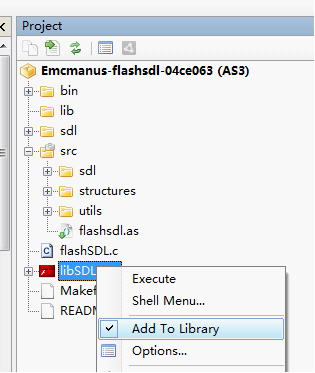
Run FlashDevelop and create a new AS3 project in the "emcmanus-flashsdl-04ce063" folder, set "flashsdl.as" as the document class, and add "libSDL.swc" to Library.
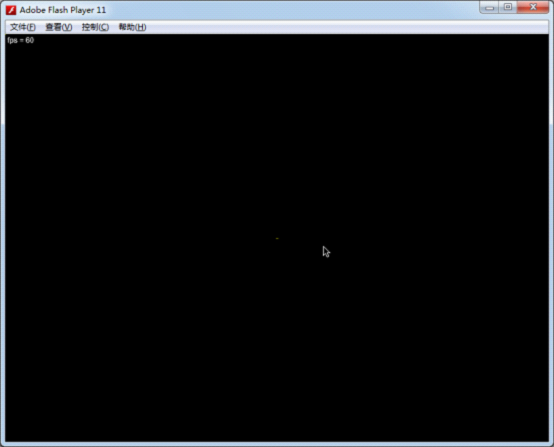
Finally build & test the project, you should see a black screen with SDL's mouse icon:
Let see the author's comments for porting your SDL application to FlashSDL:
"Porting your SDL application to FlashSDL
Perhaps this is best understood by example. Examine ./flashsdl.c. Most immediately you will have to refactor your C application's main loop to run iteratively in the tick() method, assuming you end up using the application scaffolding in ./src/.
Make sure you've properly built and installed FlashSDL by building the test application. Then try running your application's ./configure.
Once you've successfully compiled, try linking the resuling SWC with the AS3 side of your application (which should be built on ./src/).
Other Tips
You have to set the color depth of your application to 32 Bits per pixel (in your call to SDL_SetVideoMode)."
Basically, the .as files in "./src/" folder is used to fetch the SDL's pixel buffer and display this buffer using a Flash bitmap at each frame. The "flashsdl.c" should be your skeleton for your own C/C++ project. Just move the initializing code into the setup() function and refactor the mainloop into the tick() method. You can also make use of those already declared variables in that file, such as using "TMPFLASH_screen" as your main screen buffer.
2. Displaying BMP Images in Flash SDL
The code in this section is based on Lazy Foo' tutorial: http://lazyfoo.net/SDL_tutorials/lesson01/index2.php.
(Flash) SDL has build-in BMP image support. To let the Flash SDL load a BMP image, we need to modify some AS3 code:
in "\src\sdl\LibSDL.as"
internal var cLoader:CLibInit;To
public var cLoader:CLibInit;Then embed the image file and supply it to Alchemy - related AS code in modified "flashsdl.as":
[Embed(source="../hello.bmp",mimeType="application/octet-stream")]
public static var hellobmpClass:Class;
...
this.libSDL = new LibSDL();
this.libSDL.cLoader.supplyFile("hello.bmp", new hellobmpClass());
...
Now you can load the image "hello.bmp" form C side normally. Please find the full C side code for loading and displaying the image in my source code package for this tutorial.After adding the image loading and displaying code on the C side, recompile you will see something like this:

3. Playing Sound in Flash SDL
The Flash SDL does not have sound support yet on the C side.There is a fork on github which tried to add sound support, https://github.com/kompjoefriek/flashsdl, but it is not usable yet and there is no updates for a long time. Noticing that most SDL applications are using SDL_mixer library instead of SDL_sound, I think a much wiser way is to use Flash's build in sound support instead of porting both libraries. You can also find my simple solution for playing "mp3" files in source code package (ALC_GE2D_PlaySound.c, flashSDL_sound.c), I just wrote some simple function calls to let the C function call the AS3 method for playing mp3.
4. True Type Font support and SDL_ttf in Flash SDL
Thanks to Emcmanus again, who has already ported the FreeType library to Flash, we can use the SDL_ttf library in Flash SDL to display true type font texts.
First, goto https://github.com/emcmanus/FlashFreeType, download the compiled lib in the repository zip,
Copy "freetype.l.bc" into "D:\alchemy-cygwin-v0.5a\usr\local\lib",
and
Copy all header files in ".\src\c\freetype-2.3.9\include" to "D:\alchemy-cygwin-v0.5a\usr\local\include".
Then download the source file of SDL_ttf, form http://www.libsdl.org/projects/SDL_ttf/, put SDL_ttf.h SDL_ttf.c into the same folder of "flashSDL_sound_font.c", and include both files in "flashSDL_sound_font.c" using
#include "SDL_ttf.h"
#include "SDL_ttf.c"
After added some testing code for displaying text in "flashSDL_sound_font.c"'s setup method (please find the related C code in this tutorial's source code package, which are all based on http://lazyfoo.net/SDL_tutorials/lesson07/index.php), build the swc using some command like:
g++ flashSDL_sound_font.cpp -DFLASH -Ifreetype -Isdl -lfreetype -lSDL -swc -O3 -o libSDL.swcAlso embed and supply the font file to C:
[Embed(source="../lazy.ttf",mimeType="application/octet-stream")]
public static var fontClass:Class;
...
this.libSDL.cLoader.supplyFile("lazy.ttf", new fontClass());
Recompile the swf, you will see the font displaying successfully: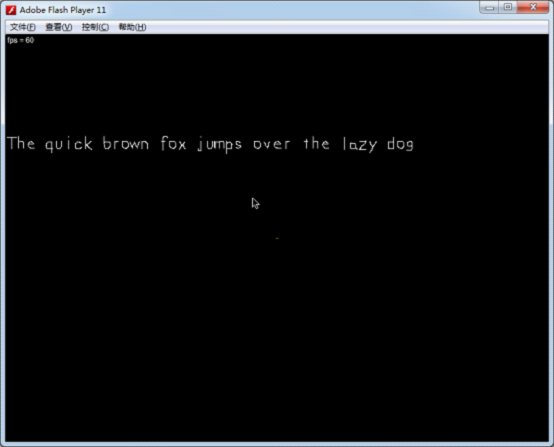
Note: when using g++ to build the swc instead of gcc, you may need to edit some function declarations from "flashSDL_sound_font.c" to:
AS3_Val setup(void *data, AS3_Val args);//need arguments here!
AS3_Val quitApplication(void *data, AS3_Val args);//need arguments here!
AS3_Val tick(void *data, AS3_Val args);//need arguments here!
AS3_Val FLASH_getDisplayPointer(void *data, AS3_Val args);//need arguments here!
5. Fix the Arrow Keys Bug in Flash SDL
You may find that arrow key event will be ignored if you're using the precompiled "SDL.l.bc" provided by the author. This is very inconvenient since many game applications are heavily relying on arrow keys. To add arrow key support, find the "SDL_flashevents.c" file in "\emcmanus-flashsdl-04ce063\sdl\src\video\flash\" folder, goto the "FLASH_InitOSKeymap" function and add four lines for mapping arrow key events at the end of that function as below:
void FLASH_InitOSKeymap(_THIS)
{
...
keymap[SCANCODE_APOSTROPHE] = SDLK_QUOTE;

keymap[38] = SDLK_UP;
keymap[40] = SDLK_DOWN;
keymap[37] = SDLK_LEFT;
keymap[39] = SDLK_RIGHT;
}
Recompile the "SDL.l.bc"In sdl/:
make -f Makefile.flash clean all;
cd F:/alchemy/emcmanus-flashsdl-04ce063/sdl
Copy the compiled "SDL.l.bc" (F:\alchemy\emcmanus-flashsdl-04ce063\sdl) into "D:\alchemy-cygwin-v0.5a\usr\local\lib" and replace the old one. You can also find the updated "SDL.l.bc" in my source code package. If you don't want to recompile the whole Flash SDL library, simply copy mine and replace the old one.
After that, recompile the swc and your Flash project, arrow keys should work then.
6. Fix the supplyFile bug in Alchemy
This bug had been described by me here: http://forums.adobe.com/thread/942556. The usual problem brought by the bug is that game saves can only be loaded once (if you use fopen on the C side) in each game session. You always need to restart the flash player (and hence your game) to load game saves if you have used the first opportunity. The bug is caused by that using "supplyFile" twice with the same file path won't work if you ever used "fopen" between the two "supplyFile"s.
To fix this bug, you need to modify the generated .as file by Alchemy as described in my old post:
http://bruce-lab.blogspot.sg/2011/01/adobe-alchemy-hacks-compile-as-source.html
First download the fixed version of "alc-asc" here: http://flaswf.googlecode.com/svn/trunk/QuickAlchemy/Hack/SWC/, put it into your "alchemy/achacks" folder, and search & replace the string "F:/alchemy/" to your Alchemy path (mine is "D:/alchemy-cygwin-v0.5a/").
When building the swc using Alchemy, keep the "XXXX.achacks.as" file, then open it, commentize the line "if(!res)" in the function "fetch", so the patched function should look like this:
private function fetch(path:String):Object
{
var res:Object = statCache[path];

//if(!res)
{
var gf:ByteArray = gfiles[path];
...
Finally, recompile the ".as" file into the swc.alc-asc 6956.achacks.as libSDL.swcWith this patched swc, "supplyFile" will work well.
Links:
1. The source code package for this tutorial:
https://flaswf.googlecode.com/svn/trunk/flaswfblog/Tutorials/FlashSDL
2. Two example SDL games ported to Flash (with full source code):
Infinite Balls:
Demo: https://en.mochimedia.com/community/games/Bruce_Jawn/infinite-balls
Source Code: https://flaswf.googlecode.com/svn/trunk/Games/InfiniteBalls
Sword Girl:
Demo: https://en.mochimedia.com/community/games/Bruce_Jawn/_v52410
Source Code: https://flaswf.googlecode.com/svn/trunk/Games/GirlSwordFlash
3. Array @ARGV missing the @ in argument 1 of shift() at problem
http://forums.adobe.com/message/3892045
4. Flash SDL FlasCC version:
https://github.com/alexmac/alcextra

 Posts
Posts

